
Update:
Syntax: SDK.REST.updateRecord(id, object, type, successCallback, errorCallback)
| Name | Type | Description |
| id | String | A String representing the GUID value for the record to update. |
| object | Object | A JavaScript object with properties corresponding to the Schema Names for entity attributes that are valid for update operations. |
| type | String | The Schema Name of the Entity type record to retrieve. For an Account record, use “Account” |
| successCallback | Function | The function that will be passed through and be called by a successful response.Nothing will be returned to this function. |
| errorCallback | Function | The function that will be passed through and be called by a failed response.This function must accept an Error object as a parameter. |
Task: Update Phone Number of an Existing Account using AccountId.
Solution: Add the below Script in “new_sdkOperations” Webresource and click Ok.
Please do check REST – Retrieve Example for Initial Setup
function updateAccount() {
var account = {};
account.Telephone1 = "9876543210";
 SDK.REST.updateRecord("{312B24BA-7CC1-E311-AAEF-D89D67790688}", account, "Account", updateSuccessCallback , errorHandler); //Provide Existing Account record GUID
}

function updateSuccessCallback (){
alert("The account record changes were saved");
}

function errorHandler(error) {
alert(error.message);
}
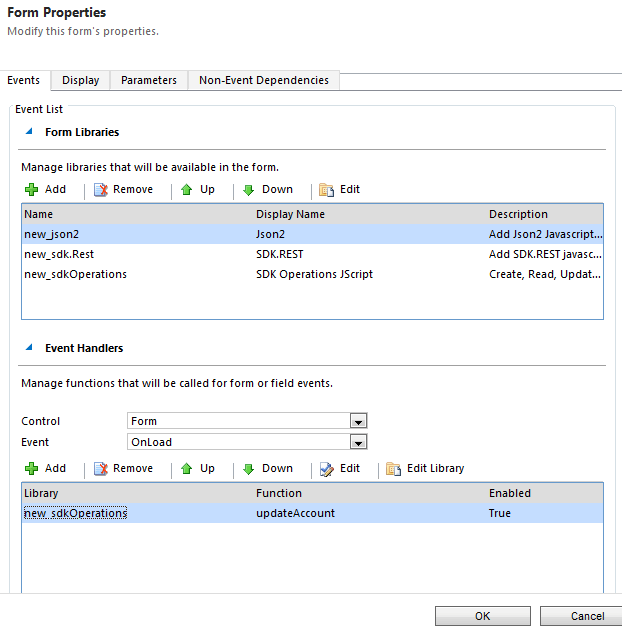
Add OnLoad event in Account Form, Library: new_sdkOperations &function updateAccount. Save and Publish
Output:

Please provide your valuable feedback on this article.
Discover more from Arun Potti's Power Platform blog
Subscribe to get the latest posts sent to your email.
Thanks for article.It helps me a lot.
Thank you Shiva Ram 🙂
You’ve gotten one of the better internet websites